TrackersByHand · Spreadsheet
Debt Payoff Tracker
Snowball vs avalanche, side by side, with your real debt-free dates.
$19 one-time payment · yours to keep
Buy the Debt Payoff Tracker — $19
Delivered by Payhip as an instant download. Works in Google Sheets and Microsoft Excel.
What it does
List up to 12 debts on the My Debts tab — balance, APR, and minimum payment for each. The Debt Payoff Tracker builds both payoff plans for you: the Snowball Plan (smallest balance first) and the Avalanche Plan (highest APR first), each with a full month-by-month schedule, and the Dashboard puts the two finish lines next to each other so the choice is made with numbers, not advice from a comment thread.
- Up to 12 debts, with balance, APR, and minimum payment for each
- Both plans built for you — snowball and avalanche, month by month
- Dashboard compares debt-free dates and total interest for both, plus a minimums-only path
- Add an extra monthly amount on the Settings tab and watch both dates move
- Type only in the pale amber cells — every formula cell is locked and protected
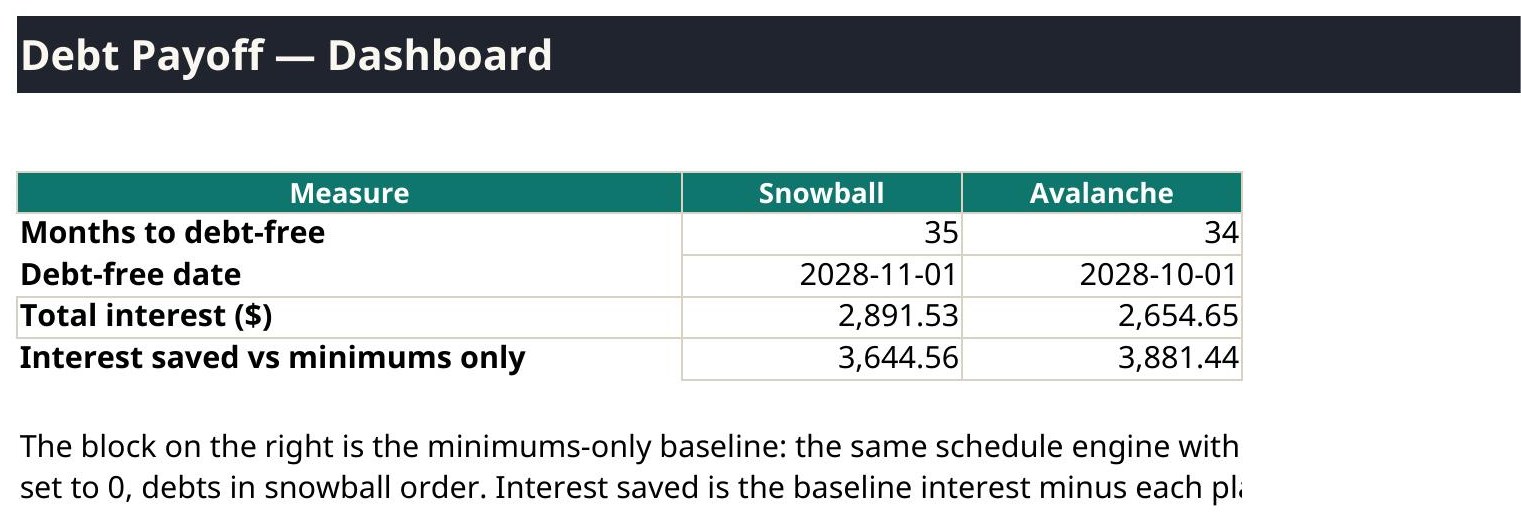
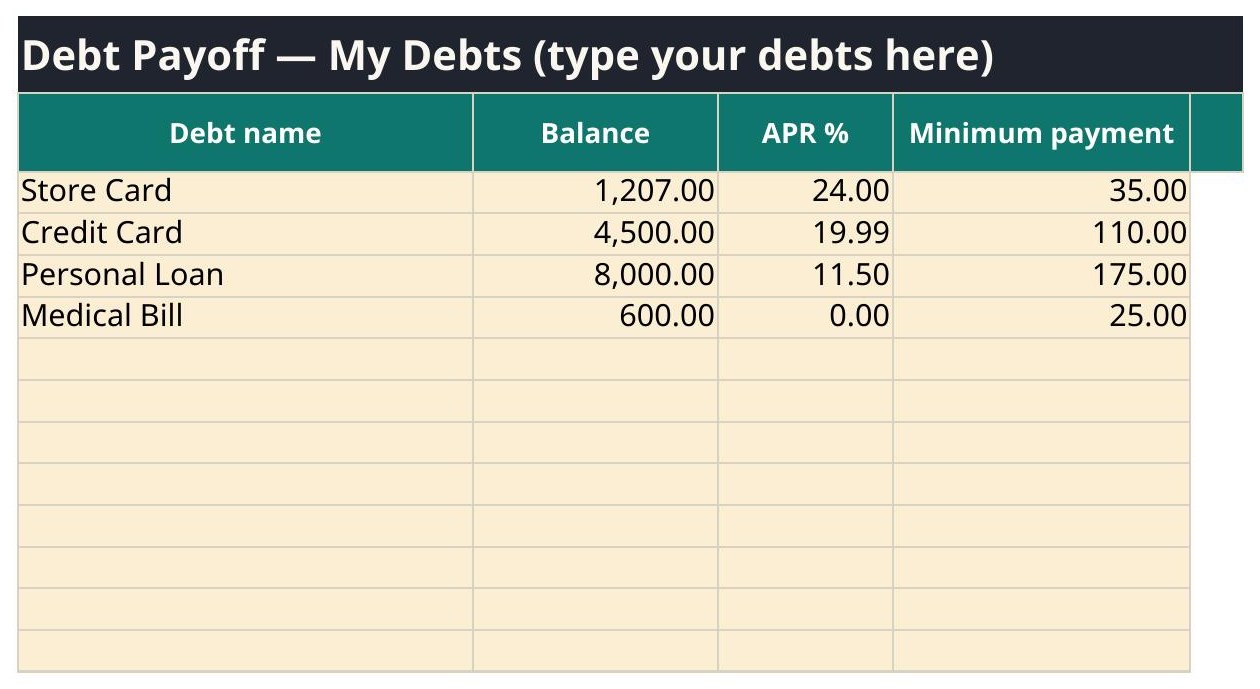
The worked example in the demo copy
Snowball: debt-free Nov 2028, interest $2,891.53. Avalanche: debt-free Oct 2028, interest $2,654.65. Minimums only: 68 months, interest $6,536.09. Same debts, same extra payment — the only difference is the order.
The tabs, exactly as shipped
| # | Tab |
|---|---|
| 1 | Start Here |
| 2 | Settings |
| 3 | My Debts |
| 4 | Snowball Plan |
| 5 | Avalanche Plan |
| 6 | Dashboard |
6 tabs. The tab names above are read from the shipped file itself.
What is inside your download
- Excel copy (clean, ready for your numbers) and a filled Excel example copy
- Google Sheets copy (clean) and a filled Google Sheets example copy
- QuickStart PDF — one page, the setup in plain words
- Version 1.0 — October 2026, with a changelog on the Start Here tab
Questions
Where are my files?
Right after checkout, your download page lists every file: the Excel copy, the Google Sheets copy, a filled example copy of each, and the one-page QuickStart PDF. The same links are in your checkout email. Download them all and keep the clean copies untouched as your backups.
Sheets or Excel — which do I open?
Whichever you use. Open the file with GoogleSheets in its name in Google Sheets (File → Make a copy, then work in your copy), or open the plain file in Microsoft Excel. Both copies do the same math — they were checked against each other.
What if I type over a formula?
You should not be able to: formula cells are locked and every sheet is protected. Type only in the pale amber cells. If a number ever looks wrong, close the file, go back to your clean copy, and re-enter just the pale cells — that is why the clean copy stays untouched.
Can I use it on my phone?
Yes. Both the Google Sheets app and the Excel app open these files, and the formulas work the same. A bigger screen is easier for the wide tabs, but checking a dashboard number on your phone works fine.